260920-RedisWindows-下载安装

  1. Redis Windows
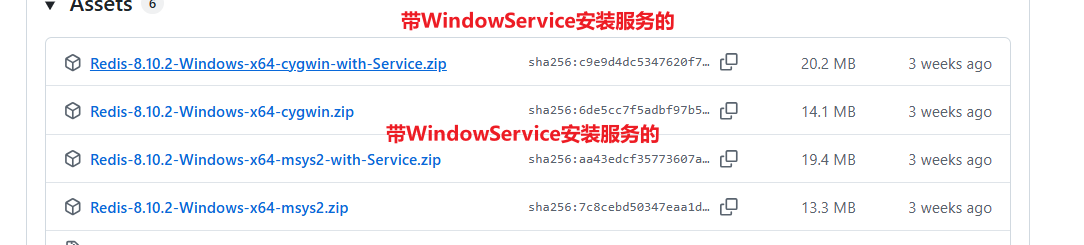
  2. redis msys2 和 cygwin的区别
    1. 使用方式
      1. 方式一:RedisService.exe(推荐)
  3. Winsw.RedisService安装配置.配置后台服务
    1. redis.conf

Redis Windows

https://github.com/redis-windows/redis-windows

https://github.com/redis-windows/redis-windows/releases

redis msys2 和 cygwin的区别

对比项 MSYS2 Cygwin
核心目标 在 Windows 上构建/运行原生 Windows 程序 在 Windows 上提供尽量完整的 POSIX/Unix 环境
底层 基于 Cygwin + MinGW-w64 自己的 POSIX 兼容层
典型 DLL msys-2.0.dll(MSYS 环境程序) cygwin1.dll
原生 Windows 程序 支持得更好 通常运行在 Cygwin 兼容层中
包管理 pacman,类似 Arch Linux setup.exe
Windows 路径 /c/Users/... 常见 /cygdrive/c/Users/...
编译出的程序 可以通过 MinGW/UCRT 生成真正 Windows .exe 通常依赖 cygwin1.dll
Unix 兼容性 够开发、编译使用 更完整
更适合 GCC、Make、CMake、Redis 等 Windows 移植/编译 跑 Unix shell 工具、Unix 软件兼容环境

MSYS2 本身其实就是从 Cygwin 技术体系演化出来的,但目标不同:

  • Cygwin 希望让 Unix 软件尽量原封不动运行在 Windows;

  • MSYS2更希望最终生成 Windows 原生程序。

1791526024916

使用方式

方式一:RedisService.exe(推荐)

自动处理路径转换,支持 Windows 原生路径。

1
2
3
4
5
6
7
8
9
10
11
12
13
14
15
16
17
# 前台运行
RedisService.exe run --foreground --port 6379 --dir C:\redis-data

# 安装为 Windows 服务
RedisService.exe install -c C:\config\redis.conf --dir D:\data\redis --port 6379
net start Redis

# 卸载服务
RedisService.exe uninstall

-- 示例
cd C:\devops\Redis-8.10.2-Windows-x64-msys2-with-Service

.\RedisService.exe install -c C:\devops\Redis-8.10.2-Windows-x64-msys2-with-Service\redis.conf --dir C:\devops\Redis-8.10.2-Windows-x64-msys2-with-Service\data --port 6379

net start Redis

Winsw.RedisService安装配置.配置后台服务

redis-vector-server.xml

1
2
3
4
5
6
7
8
9
10
11
12
13
14
15
16
<service>
<!-- ID of the service. It should be unique across the Windows system-->
<id>redis-vector-server</id>
<!-- Display name of the service -->
<name>redis-vector-server</name>
<!-- Service description -->
<description>Redis向量库</description>
<executable>C:/km-edge-service/ops-tools/Redis-8.10.1-Windows-x64-cygwin/redis-server.exe</executable>
<arguments>redis.conf</arguments>
<!-- Path to the executable, which should be started -->
<startmode>Automatic</startmode>
<log mode="roll-by-size">
<sizeThreshold>10240</sizeThreshold>
<keepFiles>8</keepFiles>
</log>
</service>

redis.conf

1
2
3
bind * -::*
port 16379
requirepass TestPassword1234.@#$%^^&&^
归档 GitHub